













Contents
Sawspin Login
Sawspin login works with an Australian mobile number or a username plus a password of 6 to 20 characters.
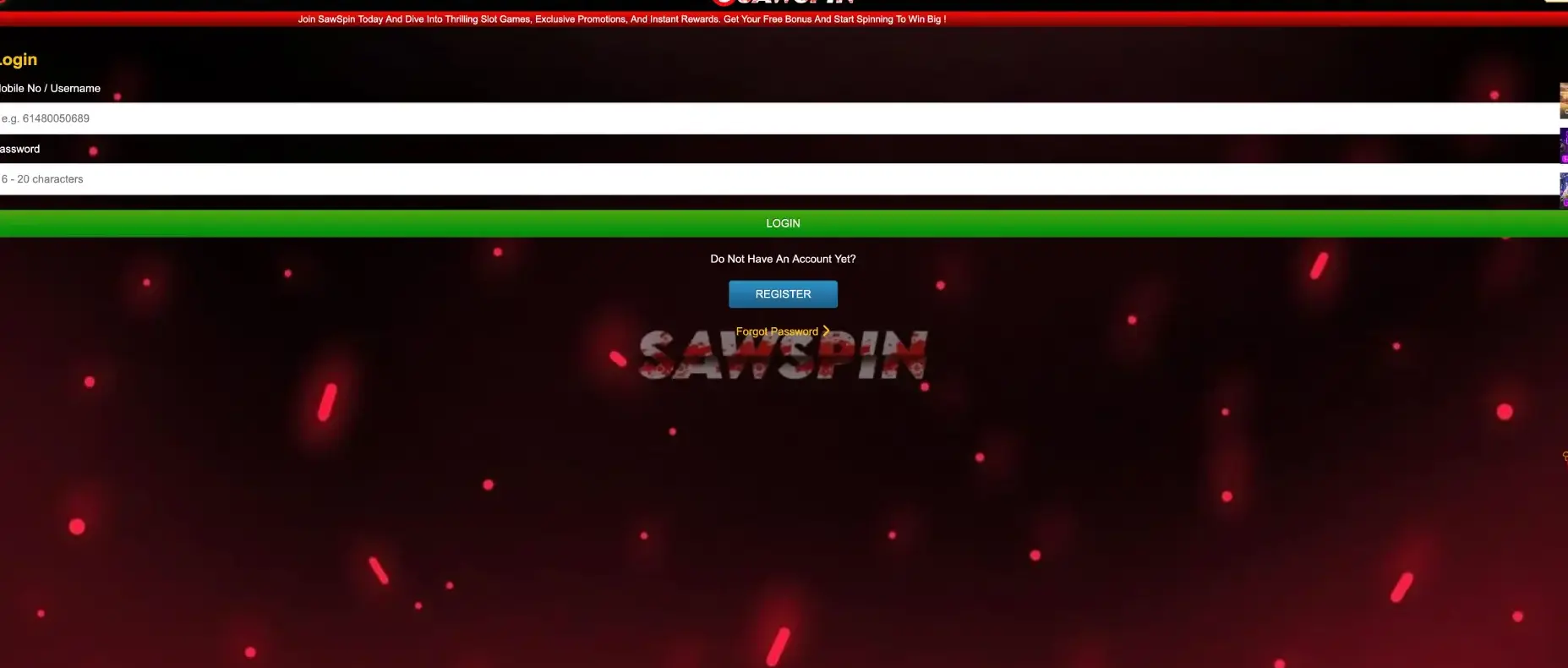
The mobile number is entered in international format without the plus sign, for example 614XXXXXXXX, and the green LOGIN button opens the account with an AUD balance, the Deposit, Withdraw and Refresh buttons and access to all promotions. A Forgot Password link under the login form restores access if the password is lost, and the same form works on desktop and mobile browsers.
This page covers the full sign-in process, account creation for players without a profile, password recovery, mobile login, fixes for the most common errors and what the account area contains after signing in.
| Login essentials | Details |
|---|---|
| Where to log in | LOGIN button in the right-hand panel of the Sawspin lobby |
| Login ID | Mobile number (61 format) or username |
| Mobile number example | 614XXXXXXXX — no plus sign, no leading zero |
| Password length | 6-20 characters |
| Password reset | Forgot Password link under the Register button |
| Device support | Desktop and mobile browsers on iOS and Android |
| Currency after login | AUD |
| Minimum deposit / withdrawal | AUD 10 / AUD 50 |
| Verification | May be requested before a withdrawal |
The most frequent login problem at Sawspin comes from the mobile number format, which is covered in detail in the troubleshooting section below.
How to complete the Sawspin login
The login form is a single page with two fields and one button. It opens from the LOGIN button in the lobby's right-hand panel, directly above the balance area.
Step-by-step Sawspin login
The following steps apply to both desktop and mobile browsers.
- Open the official Sawspin site.
- Click LOGIN in the right-hand panel or the bottom navigation bar on mobile.
- In the Mobile No / Username field, enter your number starting with 61, for example 614XXXXXXXX, or your username.
- Enter your password in the Password field (6-20 characters, case-sensitive).
- Click the green LOGIN button.
- Check that your AUD balance appears in the right-hand panel, then press Refresh if a recent deposit is not yet shown.
Once signed in, the session stays active in the browser until you log out or clear cookies, so there is no need to repeat the process on each visit from the same device.
No account yet: Sawspin registration
Below the login button, the form shows the line "Do Not Have An Account Yet?" with a blue REGISTER button. New players use it to create a profile and receive the free AUD 20 sign-up credit.
Quick registration flow
Registration uses the same mobile number that will later serve as the login ID.
- Click REGISTER on the login page or in the lobby.
- Enter an Australian mobile number in 61 format.
- Create a password of 6-20 characters.
- Complete any confirmation the site requests.
- Log in and claim the free AUD 20 credit on the promotions page.
Players with a referral link should open it before registering, so the new account is linked to the friend who shared it and that friend receives the AUD 3 downline reward.
Secure Sawspin login practices
Because a Sawspin account is tied to a phone number and holds real AUD funds, a few habits keep it protected.
- Use a unique password that is not shared with email or social media accounts.
- Choose a password close to the 20-character limit and mix letters, numbers and symbols.
- Log in only through the official Sawspin address and avoid links from unknown messages.
- Log out after playing on a shared or public device.
- Never share your password or verification codes, including in Telegram or WhatsApp groups.
- Keep the registered mobile number active, since it is needed for recovery.
Community channels are active at Sawspin, which also makes them a target for impersonators. Support staff do not need your password to help with an account.
Password recovery
The Forgot Password link sits below the REGISTER button on the login page. It starts the recovery process linked to the registered mobile number.
Reset steps
The reset takes a few minutes if the mobile number on the account is still active.
- Open the login page and click Forgot Password .
- Enter the mobile number or username linked to the account.
- Follow the confirmation step sent to that number.
- Create a new password of 6-20 characters.
- Return to the login form and sign in with the new password.
If the registered number is no longer in use, contact support through the chat icon and be ready to confirm details such as recent deposits.
Sawspin login on mobile
The mobile version of Sawspin runs in Safari, Chrome or any modern browser and uses the same login form as desktop. A fixed bottom navigation bar gives quick access to the main sections once signed in.
Tips for mobile login
A few settings make repeat logins on a phone faster.
- Add Sawspin to the home screen so the site opens in one tap.
- Allow the browser to save the password only on a personal, locked device.
- Switch off data saver or content blockers if the form does not respond.
- Rotate to portrait mode for the full-width login fields.
The login ID and password are identical on every device, so an account created on desktop opens on mobile without extra steps.
Troubleshooting common Sawspin login errors
Most login problems fall into four groups. Each has a quick fix that can be tried before contacting support.
Wrong mobile number format
The login field expects the number in 61 format. Entering it with a leading zero (04XXXXXXXX) or with a plus sign (+614XXXXXXXX) can return an error even with the correct password.
- Remove the leading zero and add 61 at the start: 0412 345 678 becomes 61412345678.
- Do not use spaces, dashes or the plus sign.
- If you registered with a username, try logging in with that instead.
Incorrect password
Passwords are case-sensitive and must be 6-20 characters. Check that Caps Lock is off and that the browser has not autofilled an older password. After several failed attempts, use Forgot Password rather than continuing to guess.
Browser or cache issues
If the page loads but the LOGIN button does not respond, the browser may be holding outdated site data.
- Clear cache and cookies for the Sawspin site and reload.
- Disable ad blockers or script blockers for the site.
- Try another browser such as Chrome, Safari or Firefox.
Account blocked or restricted
An account can be restricted after repeated failed logins, duplicate accounts on the same number or a pending verification. In this case, contact support with the registered mobile number and a short description of the issue.
What you access after the Sawspin login
After signing in, the lobby unlocks all account features. The right-hand panel switches from the LOGIN and REGISTER buttons to the balance view.
- Balance in AUD with Deposit, Withdraw and Refresh buttons.
- Game tabs: Booongo, Aristova, Slot, Hot, Sport, Fast Game and Live.
- Promotions page with Booongo daily free spins, AUD 10 free credits and task bonuses.
- Referral tools: Share, Downline, Copy Link and More Info.
- Leaderboard with daily rankings and payout ratios.
- RTP Game Rate, Shake & Check and VIP Tier Bonus panels.
Promotions such as the free AUD 20 credit and the daily free spins can only be claimed while logged in, so it is worth signing in before opening the promotions page.
Account verification (KYC)
Sawspin may ask players to confirm their identity before the first withdrawal or when account activity triggers a review. Verification protects the account and confirms that the person withdrawing funds is the account holder.
Typical requests include a photo ID such as a driver licence or passport, proof of address issued within the last few months and confirmation of the payment method used. The name on documents should match the details on the account. Completing verification before requesting a first withdrawal above AUD 50 helps avoid delays.
Sawspin login FAQ
These answers cover the most common questions about signing in to Sawspin.
How do I log in to Sawspin?
Click LOGIN, enter your mobile number in 61 format or your username, type your password and press the green LOGIN button.
What number format does the Sawspin login use?
The number starts with 61 and has no plus sign or leading zero, for example 614XXXXXXXX.
How long can a Sawspin password be?
The password must be between 6 and 20 characters and is case-sensitive.
I forgot my password. What should I do?
Use the Forgot Password link on the login page and follow the recovery step linked to your registered mobile number.
Can I use the same Sawspin login on my phone?
Yes. The same mobile number and password work in any mobile browser on iOS and Android.
Why is my balance not showing after login?
Press the Refresh button under the balance. If a deposit is still missing, contact support with the transaction time and amount.
Do I need a promo code to log in?
No. A code is never needed for the Sawspin login. Promotions are claimed separately on the promotions page.